Madden NFL for Beginners: Play Calling, Controls and Modes
New to Madden? Read the play-call screen, throw lob, touch and bullet passes, run, defend, and choose between Franchise, Superstar and MUT.
Madden NFL can overwhelm new players before the first snap. The play-call screen alone offers dozens of formations and hundreds of plays, and the controller seems to do something different on every down. Underneath all that, though, Madden follows a clear logic. If you understand what you are choosing before the snap and what each button does after it, the game becomes far more approachable.
This guide is built around Madden NFL 27, developed by EA Orlando and released on August 13, 2026 for PS5, Xbox Series X|S, Nintendo Switch 2 and PC, after an Apple Arcade release on August 4. Inputs use PlayStation names with Xbox equivalents in brackets. For the bigger picture of sports game series, see our beginner’s guide to the major series.
Reading the Play-Call Screen
Every down starts with the play-call screen. It is organized in layers:
- Formation family. Groups such as Gun (shotgun), Singleback, I-Form and Pistol on offense, or 4-3, 3-4 and Nickel on defense. The formation decides where players line up.
- Specific set. Within a family, sets vary personnel and alignment, for example how many receivers, tight ends and running backs are on the field.
- Play. The actual call: a pass concept, a run, a screen, a coverage or a blitz.
Most screens also offer shortcuts: recommended plays suggested by the game, a search, and filters by play type. Beginners should use suggestions freely. As you learn, start building a small set of plays you understand rather than picking at random.
Offensive play types
- Inside runs attack between the tackles. Reliable for short yardage.
- Outside runs stretch the defense toward the sideline. Bigger plays, bigger risk.
- Quick passes are short routes for fast, safe gains against pressure.
- Deep passes take longer to develop and need protection.
- Screens and play-action use deception to punish aggressive defenses.
Reading the play art
On offense, the diagram shows each receiver’s route. On defense, colors show assignments: zone defenders have colored zones that indicate which area they cover, while man defenders are linked to the player they follow. Spend a few seconds reading play art before every snap; it tells you where the ball should go.
Passing: Lob, Touch and Bullet
Each eligible receiver has a button icon above them. How you press that button changes the throw:
| Pass | How to throw it | Best for |
|---|---|---|
| Lob | Quick tap of the receiver button | Over the top of underneath defenders, deep routes with a step on the defender |
| Touch | A medium press, between tap and hold | Dropping the ball between levels of the defense |
| Bullet | Hold the receiver button | Tight windows, short and intermediate routes |
Modifiers adjust the placement. Holding L1 [LB] while throwing sends a high pass, useful for tall receivers and away from underneath defenders. Double-tapping a receiver button triggers a pump fake. Pressing R3 throws the ball away to avoid a sack.
The key is knowing which receiver to look at. A practical habit is to choose a “progression” before the snap: first read, second read and safety valve. If the first option is covered, move on rather than forcing it.
Protecting the quarterback
Holding L2 [LT] before the snap opens the protection options, letting you adjust blocking. If a blitz is coming, quick passes and checkdowns to the running back are your friends. A sack is often worse than an incomplete pass.
Running the Ball
Hold R2 [RT] to sprint, but do not sprint before you see the hole. Patience behind your blockers is the most important running skill. Once you are through the line, ball-carrier moves help gain extra yards:
- Juke: flick the right stick left or right.
- Spin: Circle [B], or rotate the right stick.
- Truck: flick the right stick up to run through a defender.
- Stiff arm: Cross [A].
- Hurdle: Triangle [Y].
- Slide or dive: tap or hold Square [X].
Match the move to the player. A big back trucks well; a small, agile back jukes better. Using moves at the wrong time often causes fumbles or lost yards.
Defense Basics
On defense you choose a coverage and pressure combination, then take control of one player. Before the snap, the coverage adjustments menu (hold L2 [LT]) lets you shift the defense globally, for example pressing receivers or playing deeper.
User-controlling a defender
Press Circle [B] to switch to the player closest to the ball. Many experienced players control a linebacker or safety in the middle of the field, “user-defending” passing lanes. Beginners usually do better controlling a defensive lineman or a deep safety, where mistakes are less costly.
Tackling and ball skills
- Right stick tackles: up for a hit stick, down for a cut tackle, left for a lunge and right for a wrap tackle. Wrap tackles are the safest; big hits risk missing.
- Swat: Square [X] to knock the ball away.
- Play receiver: Cross [A] to play the man.
- Ball hawk / intercept: Triangle [Y] to go for the ball.
- Strip ball: R1 [RB].
Do not chase the ball carrier from behind with your user player while leaving a zone empty. The biggest beginner mistake on defense is abandoning an assignment, opening the exact space the offense wants.
Special Teams and Game Management
Kicking and punting use an on-screen meter for power and accuracy. Keep it simple at first and use the default aim. On fourth down, the game offers go-for-it suggestions in recommended plays; consider field position, score and time.
Clock management matters in close games. Running plays keep the clock moving; incomplete passes and stepping out of bounds stop it. Late in a half, quick sideline passes and timeouts can create one more scoring chance.
The Main Modes in Madden NFL 27
Play Now and practice
Quick games and practice options let you run plays against a defense with no pressure. Use them to learn a small playbook before anything else.
Franchise
Run an NFL team as a player, coach or owner across many seasons, handling the roster, contracts and drafts. Madden NFL 27 adds a “persona engine” that changes how players behave in negotiations, free agency and news, along with more detailed contracts.
Superstar
Madden’s career mode for a single created player. In recent editions, the career begins at the NFL Combine and follows your player into the league.
Madden Ultimate Team
The card-collecting mode, where you build a squad from player items in solo and online play. It includes optional purchases and paid random items. Our neutral guide on how Ultimate Team modes work covers how such modes are structured and how to set spending and playtime limits.
A Beginner Playbook Approach
- Choose one offensive formation family, such as a shotgun set, and learn five plays from it: two runs, two quick passes and one deep shot.
- Choose two defensive coverages, one zone and one man, and one blitz.
- Play several games on a low difficulty using only those plays.
- Add plays gradually as you understand why each one works.
This approach builds real understanding faster than flipping through hundreds of plays.
Down and Distance: Choosing the Right Play
The situation should drive your play call. A simple framework helps beginners make sensible choices without memorizing a playbook:
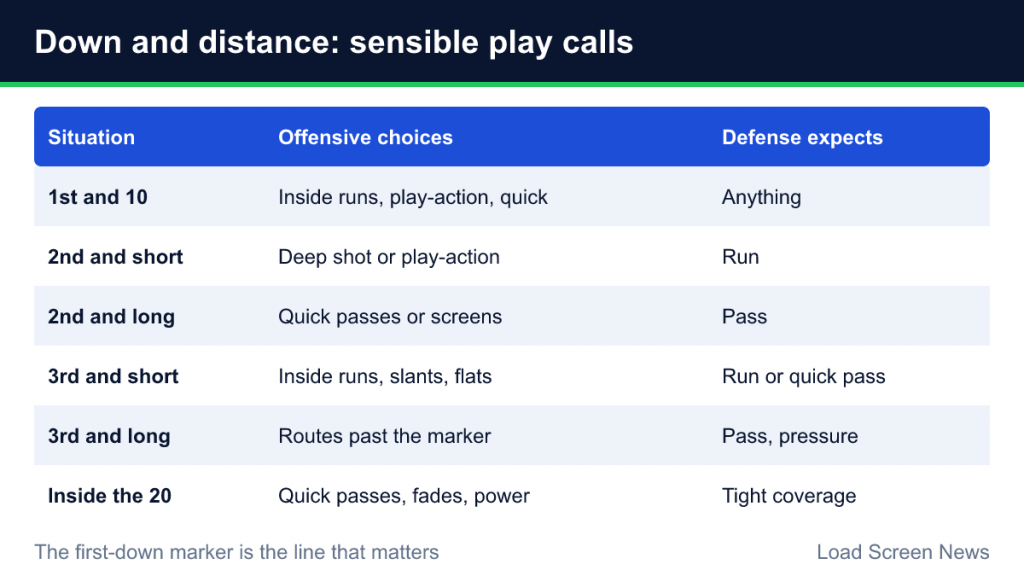
| Situation | Sensible offensive choices | What the defense expects |
|---|---|---|
| 1st and 10 | Balanced: inside runs, play-action, quick passes | Anything; keep it unpredictable |
| 2nd and short (1–3 yards) | A deep shot or play-action, since a failure still leaves 3rd and short | Run |
| 2nd and long | Quick passes or screens to get back on schedule | Pass |
| 3rd and short | Inside runs, quick slants or flats | Run or quick pass |
| 3rd and long | Routes that reach past the first-down marker | Pass; expect pressure and deep coverage |
| Inside the opponent’s 20 | Quick passes, fades to the corner, power runs | Tighter coverage in a shorter field |
On defense, mirror the logic. Against 3rd and long, play coverage that keeps receivers in front of the first-down marker. Against 3rd and short, bring more defenders near the line. When you are unsure, a balanced zone coverage is a safe default for beginners because it protects against big plays.
The first-down marker is the line that matters. A 6-yard pass on 3rd and 8 is a failed play, even if it looks like a gain. Always know where the marker is before you choose your target.
Learning Through Repetition
Madden rewards repetition more than most sports games. Run the same play several times in practice against different defenses and watch how the open receiver changes. You will start to recognize that against one coverage the slant is open, while against another the out route is free. That pattern recognition is the real skill, and practice modes are the fastest way to build it without the stress of a scoreboard.
Common Beginner Mistakes
- Holding the ball too long. Throw it away or check down instead of taking sacks.
- Sprinting into the line on runs. Let the blocks develop.
- Bullet passes everywhere. Many interceptions come from bullets thrown over the middle into zone defenders. Use touch and lob passes to throw over them.
- Going for big hits. Wrap tackles are reliable; hit sticks are high risk.
- Ignoring difficulty and sliders. Lower difficulty settings are a learning tool, and quarter length can be shortened for quicker games.
Madden is a game of decisions. The more you understand about what you called and why, the more each snap feels like football rather than button pressing.