Difficulty Levels and Sliders in Sports Games Explained
What really changes between Rookie and the hardest level, how gameplay sliders work in Madden, NBA 2K, MLB The Show and NHL, and how sim slider sets are built.

Every major sports game asks the same question before your first match: how hard do you want this to be? The answer is more complicated than it looks. A difficulty level is not a single dial but a bundle of hidden adjustments, and most series also let you open the hood with gameplay sliders that tune individual parts of the simulation. Understanding both helps you pick a challenge that is fun rather than frustrating, and it explains why some fans spend hours building “sim” slider sets for a single franchise save.
What a Difficulty Level Actually Changes
Difficulty names vary between series, but the underlying levers are similar. Raising difficulty usually changes three broad things.
1. How smart and sharp the CPU is
At lower levels, CPU opponents react more slowly, make worse decisions and leave more openings. A CPU defense in a football game might bite on obvious play action; a CPU pitcher might groove pitches over the middle; a CPU defender in a basketball game might be slow to rotate. At higher levels, the AI reads plays faster, closes passing lanes and punishes repeated tendencies.
2. How forgiving your own inputs are
This is the part many players do not realize. Difficulty often changes the margin of error on your own actions. Timing windows for shots, passes and swings tend to shrink as difficulty rises, and accuracy penalties for poor timing or bad decisions get harsher. In baseball games, for example, the area of the bat’s sweet spot and the pace of pitches are typically tied to difficulty. In basketball games, the timing window for a green release usually narrows at higher levels.
3. How strong the hidden assists are
Lower levels typically lean harder on behind-the-scenes help: defenders auto-positioning, passes finding their target more easily, CPU teammates covering your mistakes. Higher levels pull back that help so results depend more on your skill and the ratings of the players involved.
The key takeaway is that difficulty is not just “the CPU cheats more.” Often it is the reverse: low levels quietly help you, and high levels remove that help while making the CPU more competent.
Difficulty Ladders in the Major Series
Each series uses its own names, which can be confusing when you move between games.
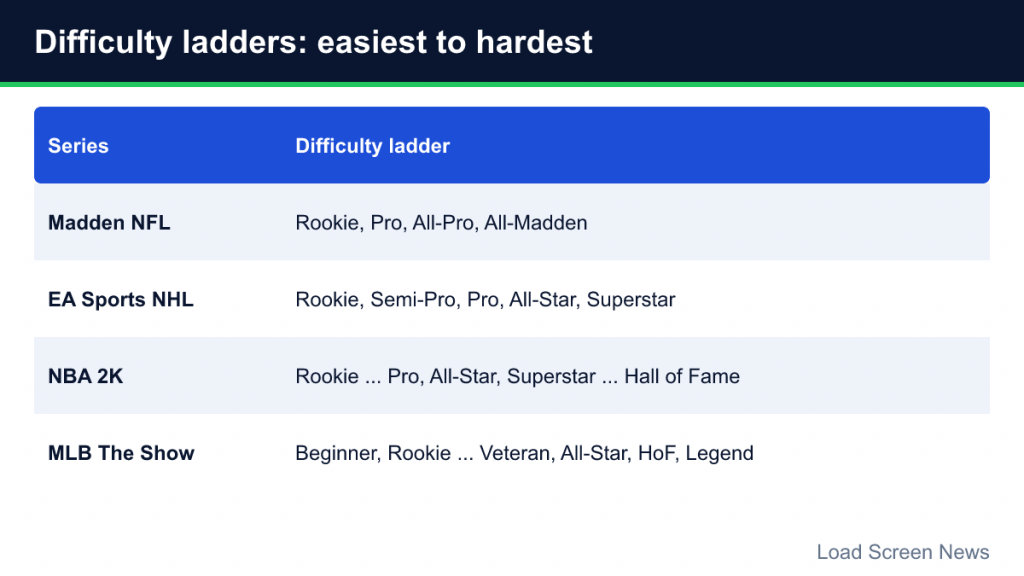
| Series | Difficulty ladder (easiest to hardest) |
|---|---|
| Madden NFL | Rookie, Pro, All-Pro, All-Madden |
| EA Sports NHL | Rookie, Semi-Pro, Pro, All-Star, Superstar |
| NBA 2K | Rookie through Hall of Fame (with Pro, All-Star and Superstar in between) |
| MLB The Show | A wide ladder from Beginner and Rookie up through Veteran, All-Star, Hall of Fame and Legend |
Madden also adds a separate choice of game style: Simulation aims for authentic NFL rules and gameplay, Arcade pushes over-the-top action with lots of scoring and limited penalties, and Competitive emphasizes stick skills and is the default for head-to-head ranked online and tournament play. Game style and skill level are independent, so you can play Simulation on Rookie or Arcade on All-Madden.
MLB The Show goes a step further by letting you set hitting, pitching and fielding difficulty separately, and it offers a Dynamic Difficulty option that adjusts the level up or down based on your results. That flexibility is useful because many players are much better at one side of the game than the other.
What Gameplay Sliders Are
Sliders are numeric controls, usually on a scale such as 0 to 100 with defaults around the middle, that adjust specific parts of the simulation. Where difficulty is a package, sliders let you change one ingredient at a time.
Most series split sliders into two sets:
- User (human) sliders affect players you control.
- CPU sliders affect the computer-controlled team.
That split is what makes sliders powerful. You can, for example, make the CPU’s quarterback less accurate without changing your own, or make your own shooting slightly harder while leaving the CPU unchanged.
How Sliders Work in Each Series
Madden NFL
Madden has two layers of options. The general game options include settings such as skill level, game style, an accelerated clock that runs the clock after a quickly chosen play, a minimum play clock time, and several defensive assists such as ball-hawk and heat-seeker help for user-controlled defenders. Global sliders cover things like injury frequency, fatigue rate and a player speed parity scale, which controls how wide the gap is between the fastest and slowest players on the field.

Beyond those, Madden’s user and CPU gameplay sliders adjust skills such as quarterback accuracy, pass blocking, catching, run blocking, fumbles, coverage, tackling and more. Penalty sliders let you raise or lower how often specific infractions are called. If you are still learning the basic controls, our Madden beginner’s guide covers the fundamentals before you start adjusting numbers.
NBA 2K
NBA 2K offers some of the most detailed sliders in sports gaming, separated into user and CPU categories covering offense (shot success by range, shot timing impact, pass accuracy), defense (steal success, contest effectiveness), attributes (speed, strength, vertical) and tendencies (how often players take certain shots or attack the rim). Game options also include quarter length and game speed. Because so much of 2K is about shot timing, the slider that controls how strongly timing affects make percentage is one of the most important for anyone trying to tune realism. New to the series? Our NBA 2K beginner’s guide explains the shot meter first.
MLB The Show
MLB The Show’s sliders tune hitting, pitching, fielding and baserunning. Common examples include contact and power for both sides, pitch speed, pitcher control, fielder reaction and throwing speed. The Show also uses gameplay styles and difficulty presets, and its Dynamic Difficulty system effectively adjusts sliders over time as you win or lose. Many players use dynamic difficulty first to find a comfortable baseline, then lock it and fine-tune manually.
EA Sports NHL
NHL’s CPU and human gameplay sliders let you adjust how players operate across skating, shooting, goaltending, checking and passing, including values such as accuracy, power, fatigue effect, fatigue recovery and injury occurrence. EA’s own beginner guidance suggests that new players lower game speed and raise options like fatigue recovery, acceleration and pass assist to ease in. Some players have reported that sliders in certain modes reset after games, so it is worth checking that your settings stick before you commit to a long save.
Game Speed and Period Length
Two settings change the feel of a sport game more than almost anything else: game speed and period length.
Game speed, available in series such as NBA 2K and NHL, controls the pace of the simulation. Slower speeds give you more time to read the play and make decisions; faster speeds reward quick reactions. Many players who are trying to build realistic games slightly lower game speed, while competitive players often prefer the default.
Quarter or period length has a big statistical side effect. Shorter periods mean fewer possessions, so box scores look smaller than real-life ones. Longer periods produce more realistic totals but take more time. Madden’s accelerated clock exists precisely to balance this: it lets you play longer quarters without running far more plays than an NFL game would, which keeps statistics closer to reality. Note that an accelerated clock option can behave differently or be restricted in certain modes, such as franchise.
Building a “Sim” Slider Set
A sim slider set is a combination of sliders designed to make results resemble real-world statistics: shooting percentages, completion rates, strikeouts, penalties and injuries. Building one is a common hobby, especially among players who run long franchise saves. Our franchise modes explainer covers why realistic stats matter so much in those modes.
A typical process looks like this:
- Pick your difficulty first. Sliders sit on top of a difficulty level, so choose the level that gives you a fair fight before you touch anything else.
- Choose a target. Decide what “realistic” means: league-average scoring, completion percentage, three-point attempts or strikeout rates.
- Play a sample of games. One game proves nothing. Track results across several games before changing anything.
- Change one slider at a time. If you change five sliders and scoring drops, you will not know which one did it.
- Adjust CPU and user sliders separately. Often the CPU needs different values from the user to produce matching results.
- Revisit after patches. Game updates can change the underlying tuning, so a set that worked at launch may need adjustments later.
Community slider sets shared on forums and fan sites can be a great starting point, but remember that they are built for a specific edition, difficulty and playstyle. A set designed for a player who loves running the ball will not necessarily suit someone who throws on every down.
Choosing the Right Difficulty for You
There is no correct difficulty, only the one that keeps you engaged. Some practical guidelines:
- If you win every game by huge margins, move up one level rather than two. Jumps between levels can be steep.
- If you lose nearly every game, step down and focus on a single skill. Many series have practice modes or drills that teach timing without the pressure of a full game.
- If one part of the game is much harder than another, look for separate difficulty settings (as in MLB The Show) or adjust the relevant user sliders.
- If results feel unrealistic but the challenge is right, keep the difficulty and tune sliders instead.
Difficulty, Rewards and Online Play
In some modes, difficulty affects more than challenge. Career and card-collecting modes in several series scale rewards or progression by difficulty, and that can push players to choose a level higher than they enjoy. It is worth checking how your chosen mode treats difficulty before deciding.
Online head-to-head play is different again. Ranked online matches usually lock difficulty and sliders to competitive defaults so both players face the same rules. Your offline slider set will not carry over, which is why players who mostly play offline sometimes find online games feel very different.
Common Mistakes
- Treating sliders as a cheat menu. Making your team unbeatable is easy and becomes boring fast. Sliders are most satisfying when used to balance, not to dominate.
- Changing too much at once. Small, single changes are easier to evaluate.
- Ignoring fatigue and injuries. Turning these off removes depth from franchise modes, where rotation and roster management are part of the strategy.
- Forgetting that defaults change. Defaults can differ by edition, so do not assume last year’s set will work in this year’s game.