MLB The Show for Beginners: Hitting, Pitching and Fielding Basics
A beginner's guide to MLB The Show: hitting interfaces and the PCI, pitching options from Classic to Pinpoint, fielding, baserunning and the main modes.

MLB The Show has a reputation as one of the most authentic sports games around, and that authenticity can make the first few innings humbling. Pitches move, the strike zone is unforgiving, and a routine grounder can turn into an error if you rush a throw. The good news is that the game offers a range of control schemes, called interfaces, plus generous difficulty options, so you can learn at your own pace. This guide explains the core choices for hitting, pitching, fielding and baserunning, and where each main mode fits, using MLB The Show 26 as the reference edition as of October 2026.
A Quick Look at the Game (as of October 2026)
MLB The Show is developed by San Diego Studio and published by Sony Interactive Entertainment. For most of its history it was exclusive to PlayStation, but that changed in 2021, when MLB The Show 21 became the first entry on Xbox One and Xbox Series X/S. MLB The Show 22 then brought the series to Nintendo Switch. The current edition, MLB The Show 26, released on March 17, 2026 for PlayStation 5, Xbox Series X/S and Nintendo Switch, with Aaron Judge on the cover.
On the field, MLB The Show 26 left core mechanics largely unchanged from the previous year but added an Automated Ball-Strike challenge system that lets you challenge certain pitch calls, plus new attributes for fielders and pitchers. That stability is good news for beginners: tutorials and advice from the last few editions still mostly apply.
Hitting: Interfaces and the PCI
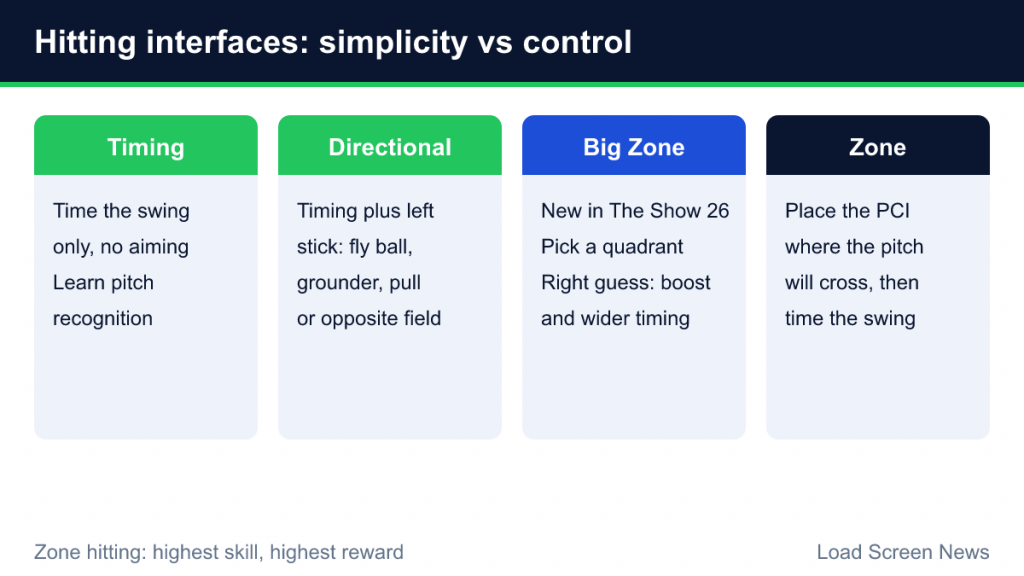
Hitting is where most new players struggle, so it is worth choosing the right interface before your first game. Each interface trades simplicity against control.
Timing hitting
The simplest option. You only time your swing; you do not aim. Contact quality depends on timing and the batter’s ratings. It is a great way to learn pitch recognition without worrying about anything else.
Directional hitting
You time your swing and also push the left stick to influence where you try to hit the ball: up for a fly ball, down for a grounder, left or right to pull or go the other way. It adds intent without requiring precise aiming.
Zone hitting
The most demanding and rewarding option. You move the PCI (Plate Coverage Indicator) over the area where you expect the pitch to cross the plate, then time the swing. Good PCI placement plus good timing produces the best contact. Zone hitting is widely considered the highest-skill, highest-reward choice.
Big Zone hitting (new in MLB The Show 26)
MLB The Show 26 added Big Zone, positioned between Directional and Zone hitting. Rather than placing a small PCI precisely, you choose a quadrant of the strike zone. If the pitch arrives in the quadrant you picked, you get a boost to contact and a more forgiving timing window, with a batter’s Contact rating influencing how large that benefit is. The PlayStation Blog described it as a new batting interface for players of all skill levels. The game also added a PCI sensitivity setting to fine-tune how quickly the PCI moves.
Hitting tips for beginners
- Do not swing at everything. Pitchers in The Show are built to get you to chase. Taking pitches off the plate is as important as hitting strikes.
- Sit on a pitch type. Early in counts, look for a fastball and time for it. Adjusting to every possible pitch is much harder.
- Use contact swings with two strikes. The game offers normal, contact and power swing types. A contact swing helps you put the ball in play when you are protecting the plate.
- Practice in a dedicated mode. Use practice options to see pitches without the pressure of a real game.
Pitching: Five Ways to Throw
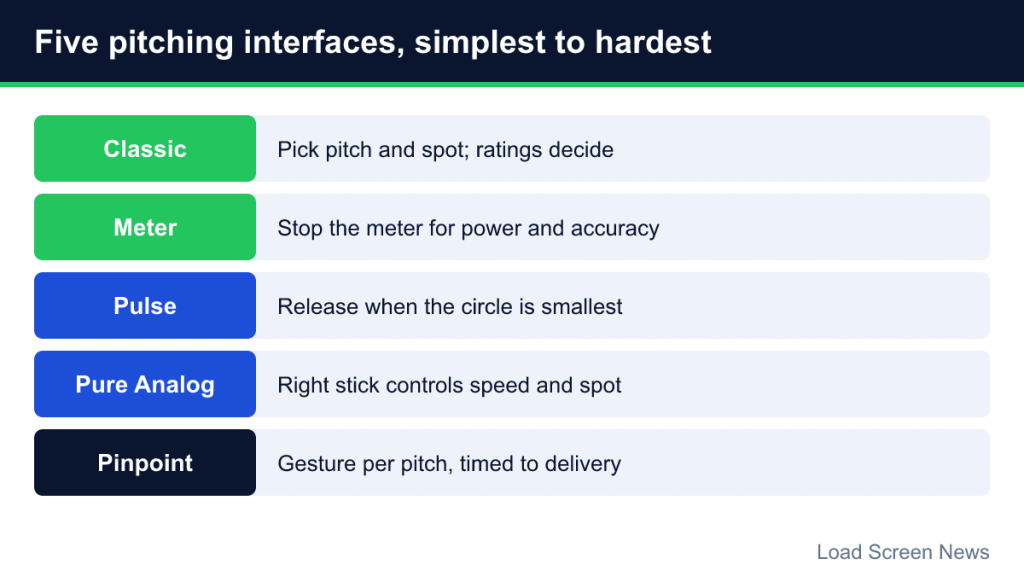
Pitching interfaces range from almost automatic to very technical.
| Interface | How it works | Good for |
|---|---|---|
| Classic | Choose a pitch and location, then throw. Accuracy is driven mostly by the pitcher’s ratings and fatigue. | Absolute beginners and players who prefer managing to executing |
| Meter | A meter fills for power and you stop it at the accuracy line. Timing on both determines result. | Players who like rhythm-based input; widely used |
| Pulse | A circle pulses around your target; releasing when it is smallest yields the most accurate pitch. | Players who want a visual timing challenge |
| Pure Analog | Use the right stick to control both pitch speed and placement. | Players who like stick-based control |
| Pinpoint | Perform a gesture on the right stick specific to each pitch, timed with the delivery. | Experienced players seeking maximum control |
Pinpoint, introduced in MLB The Show 21, is generally considered the most demanding. Each pitch has its own gesture, and both the gesture and its timing must be accurate to earn a “Good” or “Perfect” grade. The developers have tightened its grading in competitive settings over time because skilled players found it too forgiving early on.
Pitching tips for beginners
- Change speeds and locations. Throwing the same pitch to the same spot is the quickest way to give up hard contact.
- Watch confidence and stamina. Pitchers lose effectiveness as they tire. Pay attention to pitch counts and do not be afraid to go to the bullpen.
- Work ahead in the count. First-pitch strikes give you the freedom to throw pitches outside the zone later.
- Learn each pitcher’s arsenal. Every pitcher has a different repertoire and different strengths. Starting each game by checking your pitcher’s best pitch is a good habit.
Fielding and Throwing
Fielding in The Show is mostly about positioning and throwing accurately. The game handles a lot of the movement toward the ball on lower settings, but you are responsible for choosing where to throw.
Throws are made by pressing the face button that corresponds to a base. Depending on your settings, throwing can be simple button-based, or use an accuracy meter where holding the button builds strength and releasing at the right moment gives an accurate throw. Rushing a throw, especially with a fielder who has a weak or inaccurate arm, raises the risk of an error. MLB The Show 26 also added new fielder reaction attributes for different directions and a catcher pop time attribute, so the ratings of your fielders matter more than ever.
Fielding tips
- Know the situation before the pitch. Decide where you will throw on a ground ball before it is hit.
- Do not force the double play. Taking the sure out is often better than a risky throw.
- Use the cutoff man. On hits to the outfield, throwing to a cutoff player prevents runners from taking extra bases.
Baserunning Basics
Baserunning is easy to ignore and costly to get wrong. You can control individual runners or all runners at once, telling them to advance or retreat. Beginners should keep it simple:
- Let the game handle routine running at first, then take control once you understand the timing.
- Watch the ball, not your runner. Advancing on a fly ball that is caught is a common way to get doubled off.
- Stealing depends on the runner’s speed and stealing ratings as well as the catcher and pitcher. Pick your moments rather than running constantly.
Difficulty and Settings
MLB The Show offers a wide difficulty ladder, from Beginner and Rookie up through Veteran, All-Star, Hall of Fame and Legend. You can set hitting, pitching and fielding difficulty separately, which is useful because most players are better at one skill than another. A Dynamic Difficulty option adjusts levels up or down based on your performance. If you want to understand how these choices and gameplay sliders interact, read our guide to difficulty levels and sliders.
A sensible starting setup for most beginners:
- Choose Timing or Directional hitting, or try Big Zone if you want some aiming without full Zone hitting.
- Choose Classic or Meter pitching.
- Start on a low difficulty, or switch on Dynamic Difficulty.
- Move to Zone hitting and a more advanced pitching interface once you are comfortable.
The Main Game Modes
Road to the Show
The career mode, where you create a player and develop him into a big leaguer. In MLB The Show 26, the journey begins earlier: you can play high school and college baseball before the draft, including the licensed NCAA Men’s College World Series. Later-career systems cover legacy, trade requests, position changes and free agency. For how it compares to similar modes in other series, see our guide to career modes in sports games.
Franchise
Manage a whole organization across multiple seasons. MLB The Show 26 added a Trade Hub and trade logic designed to let deals develop over time.
Diamond Dynasty
The card-collecting team mode. You build a team of player cards and play offline and online through programs, ranked play and events. It has a reputation for offering many ways to earn cards through play. Like all such modes, it is best approached as a game, not a shopping trip; our neutral explainer on how Ultimate Team-style modes work covers pack probability disclosures and platform spending controls.
Other modes
MLB The Show 26 also includes Storylines: The Negro Leagues, which tells the stories of historic players, and Stadium Creator, which lets you build and share custom ballparks. Quick exhibition games and online play round things out.
Common Beginner Mistakes
- Starting on Zone hitting immediately. It is powerful but demanding. Learning timing first makes the transition easier.
- Swinging too early in counts. Patience gets you better pitches to hit.
- Leaving a tired pitcher in. Stamina loss affects accuracy and velocity.
- Ignoring player ratings. A great contact hitter and a pure power hitter need different approaches.
- Giving up too soon. Baseball games reward patience, and the first few hours are the hardest.