Driving Assists Explained: ABS, Traction Control, Stability and More
What ABS, traction control, stability, braking and steering assists, gearboxes and rewind do in racing games, and a sensible order to turn them off.
Open the settings of almost any modern racing game and you will find a list of driving assists. They are the reason a newcomer can pick up Gran Turismo 7, Forza or an official F1 game and finish a race on day one, and they are also the reason experienced players talk about “going assist-free” as a milestone. But what does each assist actually do, what does it cost you, and when should you turn it off?
This guide explains the common assists in plain terms, using the names found in Gran Turismo 7, Forza and F1 25, then suggests a sensible order for removing them. It pairs well with our guide to the racing line and braking points, since the two skills develop together.
Why Assists Exist
Real cars at the limit are difficult to control. Brakes lock, tires spin, and the rear of the car can step out without warning. On a controller, without the physical feedback of a real seat and steering wheel, those moments are even harder to catch. Assists fill the gap by intervening when the game detects that you are about to lose grip.
The trade-off is simple: assists add safety and consistency, but they usually cost some speed and control. They intervene conservatively, cutting power or braking a wheel before a skilled driver would need it. At first, that intervention makes you faster because it prevents mistakes. Later, as your inputs improve, it starts holding you back.
Anti-Lock Brakes (ABS)
What it does: prevents the wheels from locking under heavy braking. A locked wheel slides instead of rolling, which reduces braking efficiency, destroys steering ability and, in games with tire wear, can flat-spot the tire.
In games: F1 25 offers ABS as On or Off. Gran Turismo 7 offers settings including a default level that keeps some grip reserved for steering and a weaker setting for more skilled drivers, plus Off. Forza games let you switch anti-lock braking on or off.
Trade-off: ABS is one of the least costly assists. Many real road and racing cars have ABS, and in some games it is realistic to keep it on. Removing it lets you brake slightly harder at the limit, but only if you can modulate the pedal or trigger precisely. ABS is usually one of the last assists to come off, and some players never remove it. Note that real Formula 1 cars do not have ABS, which is why many F1 game players eventually switch it off for authenticity.
Traction Control (TC)
What it does: limits wheelspin when accelerating by cutting engine power when the driven wheels start to spin faster than the car is moving.
In games: F1 25 offers Traction Control as Off, Medium or Full. Gran Turismo 7 uses a numbered scale, with higher numbers intervening more; its developer has adjusted the strength of the low and high settings in updates. Forza offers traction control as an on/off assist.
Trade-off: TC makes powerful rear-wheel-drive cars manageable, especially on exit from slow corners and in the wet. The cost is lost acceleration, because the system cuts power earlier than an expert driver would. On a controller, traction control is particularly helpful because analog triggers offer limited travel for fine throttle control. Reducing TC step by step, rather than switching it off entirely, is the standard approach.
Stability Management and Countersteering
What it does: stability systems detect when the car begins to rotate more than intended and apply corrective braking or power cuts to keep it straight.
In games: Gran Turismo 7 has Active Stability Management (ASM), designed to prevent spins, and separate Countersteering Assistance, which helps you catch oversteer. In a 2023 update, Polyphony Digital reduced Countersteering Assistance’s intervention during oversteer and increased ASM’s intervention to improve stability. GT7’s Expert preset turns ASM off, while Beginner and Intermediate presets leave it on. Forza games offer Stability Control as an on/off option.
Trade-off: stability aids are among the most restrictive assists because they actively slow the car in corners. They are excellent for learning, but they can mask what the car is doing, which slows your development. Many players remove stability management early, once they are comfortable with traction control.
Braking Assist and Steering Assist
Braking assist applies the brakes for you when you approach a corner too fast. F1 25 offers Off, Low, Medium and High levels. GT7’s Auto-Drive goes further: it can engage the brakes if you enter a corner too fast and steer you back on course.
Steering assist helps guide the car around the track. In the F1 games it is an On/Off option, and EA’s documentation for the series notes that enabling it also sets braking assist and traction control to their highest levels.
Trade-off: these are the heaviest assists. They help absolute beginners or players with accessibility needs complete races, and that is valuable. But they take significant control away from you and brake much earlier than necessary. If you want to improve your lap times, braking and steering assists should be the first to go.
Gearbox: Automatic, Manual and Clutch
Automatic shifts for you. Manual requires you to shift up and down yourself. F1 25 also has a Manual & Suggested option that shows the recommended gear on screen, a useful bridge between the two. Forza additionally offers manual with clutch, which simulates operating a clutch with each shift.
Trade-off: automatic shifting is convenient but not always optimal. It may upshift mid-corner, unsettling the car, or choose a gear that is too high on exit. Manual shifting lets you hold a gear through a corner and downshift precisely under braking, which helps with engine braking and corner entry. It takes practice to do consistently, so many players switch to manual only after they are confident with braking points.
Racing Line, Rewind and Other Helpers
Racing line: an on-track guide showing where to brake and accelerate. F1 25 lets you set it to Off, Corners or Full; GT7 offers Driving Line Assistance and braking area markers; Forza offers a full line or a braking-only line. The line does not change the physics, but it can stop you from developing your own reference points.
Rewind: lets you undo a mistake by rolling back time. It is common in Forza and the F1 games offline. It is a superb learning tool when used deliberately, to retry a corner, but relying on it in every race makes it harder to build consistency.
Other helpers: recent F1 games have also included pit assist, which manages the pit lane speed limiter, and ERS and DRS assists, which manage hybrid energy deployment and the drag reduction system automatically.
Quick Reference Table
| Assist | Main benefit | Main cost | Typical removal order |
|---|---|---|---|
| Steering assist | Keeps the car on track | Very slow, little control | First |
| Braking assist / auto-drive | Prevents overshooting corners | Brakes much too early | First |
| Stability management | Prevents spins | Slows the car mid-corner | Early |
| Racing line (full) | Teaches layout and braking zones | Prevents learning reference points | Gradually (full, then partial, then off) |
| Automatic gearbox | Simplicity | Imperfect gear choice | Middle |
| Traction control | Prevents wheelspin | Slower exits | Gradually, step by step |
| ABS | Prevents lock-ups | Slightly less braking performance at the limit | Last, or never |
A Sensible Order for Turning Assists Off
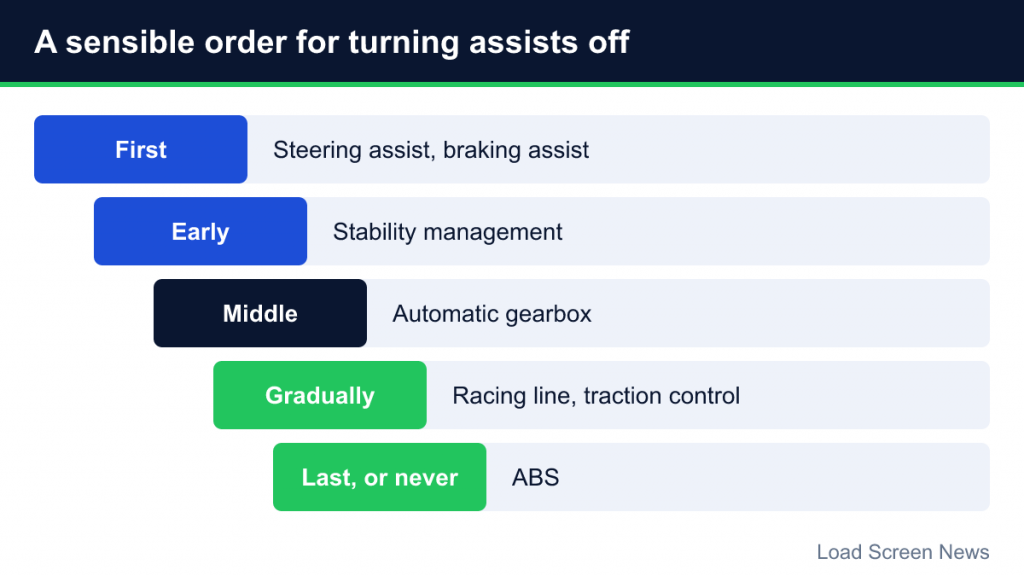
- Remove steering and braking assists (and GT7’s Auto-Drive) as soon as you can finish races without them.
- Reduce the racing line to braking-only or corners-only.
- Switch off stability management and reduce countersteering help.
- Try manual gears, starting with a suggested-gear option where available.
- Lower traction control step by step, starting with less powerful cars.
- Consider ABS off only when braking is consistent and you want the last bit of performance or authenticity.
Change one setting at a time and give each change several sessions. Your lap times will probably get slower at first. That is normal: you are learning to do the assist’s job yourself, and the improvement comes afterward.
Controller vs. Wheel Considerations
Assist choices depend heavily on your input device. On a controller, small stick movements produce large steering inputs and triggers are short, so traction control and ABS remain sensible for many players indefinitely. On a wheel and pedals, finer control makes it easier to manage without them. There is no shame in keeping assists that suit your setup.
Assists and Accessibility
Assists are not only training wheels. For many players with limited mobility, slower reaction times or other accessibility needs, heavy assists such as steering and braking help are what make racing games playable at all. Publishers increasingly document these options as accessibility features. If assists let you enjoy the game, they are doing their job, and there is no requirement to remove them.
Common Myths About Assists
- “Assists are cheating.” They are options built into the game. In online lobbies with restrictions, everyone plays under the same rules.
- “No assists is always faster.” Only once your skill exceeds what the assist provides. Many players are faster with some traction control on a controller.
- “Assists are the same in every game.” Names and behavior vary. GT7’s ASM and Forza’s Stability Control target similar problems but are tuned differently.
Assists are tools for learning and for comfort. Use them deliberately, remove them gradually, and you will understand your car far better than if you switched everything off on day one.