Madden Pre-Snap Guide: Audibles, Hot Routes and Reading the Defense
How to use audibles, hot routes, protection slides, motion and coverage reads in Madden so the play you run fits the defense you actually see.
Most Madden plays are won or lost before the ball is snapped. The play-call screen gives you a guess about what the defense will do; the few seconds at the line of scrimmage let you check that guess and fix it. Audibles, hot routes, protection adjustments and motion are the tools for that job, and learning them is the single biggest step from “picking plays that look cool” to actually running an offense.
This guide explains each pre-snap tool, what it is for, and how to combine them with a simple read of the defense. Exact button prompts change from edition to edition and between PlayStation, Xbox, Switch 2 and PC, so treat the inputs here as descriptions and confirm them in your game’s controls menu. As of October 2026 the current edition is Madden NFL 27, which launched on August 13, 2026 for PlayStation 5, Xbox Series X/S, Nintendo Switch 2 and Windows, after an Apple Arcade release on August 4. If you are brand new, start with our Madden beginner’s guide first.
Why the Pre-Snap Phase Matters
When you call a play, you are betting on a defensive look you have not seen yet. The defense is doing the same thing in reverse. Once both teams break the huddle and line up, information appears: how many safeties are deep, whether cornerbacks are pressed up on receivers or playing off, how many defenders are standing near the line, and whether anyone shifts as you move players around.
Pre-snap tools let you convert that information into a better play. A short pass concept called into a deep zone shell is often fine as it is. The same concept called into an all-out blitz may need a quicker route, an extra blocker or a different play entirely. The goal is not to change something every snap; it is to recognize the handful of situations where your original call is likely to fail and fix them quickly.
There is also a clock to respect. EA’s 2026 gameplay deep dive notes that in Madden’s Coach Mode, the pre-play window closes at 15 seconds on the play clock, after which audibles and hot route changes are no longer allowed. Even outside Coach Mode, the practical lesson is the same: decide early, adjust once or twice, and snap.
Audibles: Changing the Whole Play
An audible swaps the play you called for a different one while staying in the same personnel group. In Madden you open the audible menu at the line and choose from a short list of plays. Most editions give you a set of default audibles from your playbook, and you can customize that list from the formation screens or the playbook settings so the plays you trust are always one button away.
A sensible audible list covers a few common problems:
- A quick pass beater for when you see heavy pressure: slants, quick outs or a screen.
- A deep shot for when the defense leaves only one safety deep and your receivers face single coverage.
- An inside run for when the defense shows a light box with few defenders near the line.
- An outside run or play-action to punish defenses that crowd the middle.
Keep the list small enough that you can remember each slot without reading it.
Recent editions also add suggestion systems. For Madden NFL 27, EA describes “CoachSpeak Preplay,” which offers real-time pre-snap recommendations; holding the audible button accepts the suggestion. It is useful while learning, but treat it as a second opinion rather than an autopilot. Understanding why a suggestion was made is what lets you make the same call yourself later.
Most playbooks also let you flip a play, mirroring it to the other side of the formation, which is handy when the defense has shifted extra defenders toward one side.
Hot Routes: Changing One Receiver
A hot route changes the assignment of a single eligible player without touching the rest of the play. You select the receiver, then choose a new route such as a streak, slant, curl, in or out, or a block assignment for a tight end or running back. The rest of the concept stays as called.
Hot routes are the scalpel to the audible’s sledgehammer. Common uses:
- Beating press man coverage: a receiver facing a pressed corner with no deep help can be sent on a streak or fade.
- Adding a quick option against a blitz: converting one route to a slant or a short in gives the quarterback a fast throw, often called a “hot” read.
- Keeping a blocker in: turning a tight end or running back route into a pass block helps when you expect pressure from one side.
- Attacking a zone soft spot: changing a route to settle between underneath defenders and deep defenders, for example a curl against deep-dropping corners.
A frequent beginner mistake is hot routing so many receivers that the original concept disappears. Route concepts are designed so that routes work together, with one pulling a defender away to open another. If you are changing three or four routes every play, an audible to a different concept is usually cleaner.
EA’s 2026 deep dive also describes saved adjustment presets in its football games, where several pre-snap changes can be bundled and applied together. Availability and naming vary by game and edition, so check the in-game help for the version you own.
Protection: Slides, Blocking Assignments and Keeping Help In
Pass protection adjustments decide who blocks whom. The two you will use most are:
- Line slides: shifting the offensive line’s protection to the left or right so that more blockers are responsible for that side. If the defense overloads one edge with extra rushers, sliding protection toward them helps.
- Back and tight end blocking: assigning a running back or tight end to stay in and block, sometimes as a chip block where the player briefly hits a pass rusher before releasing into a route. EA lists chip blocking among the protection controls described in its 2026 deep dive.
Some editions also let you identify the “Mike” linebacker, which tells the offensive line where to anchor its protection count. If a blitzer is consistently coming free, check whether your protection is pointed at the wrong side or simply outnumbered. If it is outnumbered, the answer is a faster throw or an extra blocker, not just a slide.
Protection changes cost you something: every player who stays in to block is one fewer receiver. Against a four-man rush with seven defenders in coverage, keeping extra blockers in leaves your receivers outnumbered downfield. Match the number of blockers to the threat you see.
Motion and Shifts as a Coverage Tell
Pre-snap motion means sending one eligible player, usually a receiver, running back or tight end, across or along the formation before the snap. In real football and in Madden, motion has two jobs: it changes the formation’s strength and it reveals information about the coverage.
The classic tell works like this. Send a receiver in motion across the formation and watch the defender lined up over him:
- If that defender follows him across, the defense is likely in man coverage.
- If defenders stay put and simply adjust their spacing, the defense is likely in a zone.
It is not a guarantee, since some coverages pass motion between defenders, but it is a cheap and useful read.
Reading the Defense Before the Snap
You do not need to identify the exact coverage every play. A few simple questions narrow it down fast. Our guide to Madden defensive coverages explains each shell in detail; here is the quick pre-snap version.
How many safeties are deep?
Look at the two safeties. If both are deep and roughly split across the field, you are probably facing a two-high shell such as Cover 2 or Cover 4. If only one safety is deep in the middle, think Cover 1 (man with a deep helper) or Cover 3 (three deep zones). If no safety is deep, expect Cover 0, an all-out blitz with no deep help, and look for a quick throw or a deep shot against isolated man coverage.
Where are the cornerbacks?
Corners pressed right up on receivers often signal man coverage; corners several yards off often signal zone. It is a tendency, not a rule.
How many defenders are near the line?
Count defenders “in the box,” roughly between the tackles and within a few yards of the line. If you have more blockers than they have box defenders, inside runs become attractive. If they have more defenders than you can block, either throw quickly or adjust protection.
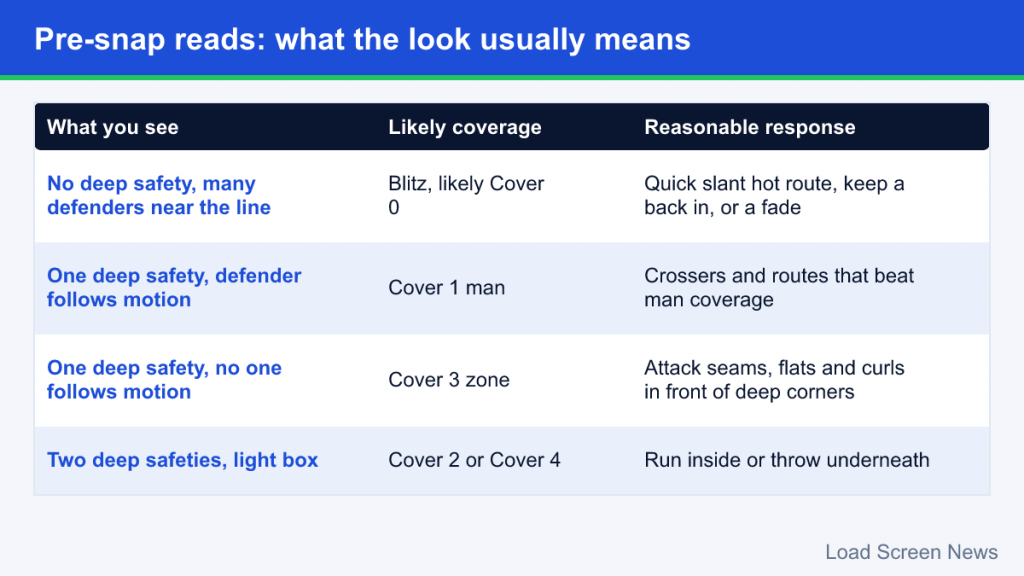
Simple responses to common looks
| What you see | Likely meaning | Reasonable response |
|---|---|---|
| No deep safety, many defenders near the line | Blitz, likely Cover 0 | Hot route to a quick slant or keep a back in; consider a fade to a fast receiver |
| One deep safety, defender follows motion | Cover 1 man | Crossing routes and routes that separate from man coverage |
| One deep safety, no one follows motion | Cover 3 zone | Attack seams and the flats, curls in front of deep corners |
| Two deep safeties, light box | Cover 2 or Cover 4 | Run inside or throw underneath and in the void between corner and safety |
A Simple Pre-Snap Routine
A consistent routine keeps you from forgetting steps or running out the clock. One workable order:
- Check the safeties to estimate the shell.
- Count the box to judge run versus pass and pressure risk.
- Use motion if the play allows it to test for man or zone.
- Make one adjustment: an audible, a hot route or a protection change, whichever fixes the most obvious problem.
- Snap with time to spare so you are not rushing or risking a delay of game.
Many snaps need no change at all; if the call already fits, snapping quickly gives a human opponent less time to shift.
Common Pre-Snap Mistakes
- Adjusting every play. Constant changes slow your tempo and often break route concepts. Change things when the look demands it.
- Ignoring the play clock. Delay-of-game penalties are entirely avoidable. Watch the clock while you read.
- Over-blocking. Keeping two extra blockers against a four-man rush leaves too few receivers against a crowded coverage.
- Trusting one tell blindly. Motion, safety depth and corner alignment together are far more reliable than any single clue.
- Not customizing audibles. Default audible lists are generic. Setting your own takes a few minutes and pays off every game.
Practicing Your Reads
The fastest way to get comfortable is repetition against known looks. In practice mode you can usually choose both the offensive play and the defensive call, which turns the guessing game into a lesson. Run the same play against Cover 0, Cover 1, Cover 2 and Cover 3, use motion each time, and watch how the defenders react. After a session or two, the alignments in a live game start to look familiar.
It also helps to learn a small set of plays deeply rather than a large playbook superficially. If you know where every route goes on five or six core concepts, you can spend your pre-snap seconds reading the defense instead of reading your own play art. When to choose which tool is simple: if one receiver’s route is the problem, hot route; if the whole concept is wrong, audible; if pressure is the problem, fix protection first.